

The fastest path off cable in Canada mixes four tools: free apps like CBC Gem, Pluto TV, and Tubi for news and casual viewing, a paid streaming bundle or IPTV subscription for full live channels, an OTA antenna for guaranteed local HD, and a targeted sports service for the games cable used to cover. Most households should start by auditing what they actually watch, then testing free apps alongside either an antenna or a short trial of a live-TV service before canceling anything.
TL;DR:
- Combining free apps like CBC Gem, Pluto TV, and Tubi can cover most households' needs for news, casual viewing, and movies without cable, with minimal cost.
- Live TV streaming services such as StackTV or RiverTV offer curated live channel bundles that closely resemble cable, but do not fully replace all cable channels or sports rights.
- An over-the-air antenna provides access to major Canadian networks in full HD, but reception depends on distance from transmitters and weather conditions.
- Reliable streaming requires a modern device like a Roku or Apple TV and sufficient internet bandwidth, especially for multiple simultaneous 4K streams.
- The cost to replace cable varies from zero with free apps and antennas to over $60-$100 monthly for sports and full-channel bundles, with upfront hardware costs like antennas or streaming devices.
Table of Contents
- What are your options for TV without cable in Canada?
- Which free apps let you watch TV without cable in Canada?
- What live TV streaming services replace cable channels in Canada?
- How do you get local channels without cable using an antenna?
- What devices and internet speed do you need to stream TV reliably?
- How do Canadians watch live sports and news without cable?
- What does it actually cost to replace cable in Canada?
- How do you choose the right cable-free setup for your household?
- How fast can you actually cut the cord in Canada?
- When does a Canadian IPTV subscription make more sense than stacking apps?
- Which cable-free stack fits your household?
- Try Toronto's Best IPTV before you commit to anything else
- Sources
- FAQ
What are your options for TV without cable in Canada?
Cutting the cord isn't a single decision. It's really four separate decisions layered on top of each other, and most Canadians end up mixing two or three.
Here's the shape of the landscape before you dig into specifics:
- Individual streaming apps (Netflix, Crave, Disney+, Amazon Prime Video) cover movies, series, and originals but rarely offer live channels the way cable does. If your household mostly watches shows on-demand and doesn't miss the six o'clock news, this alone might be enough.
- Free broadcaster and ad-supported apps (CBC Gem, network apps from CTV and Global, Pluto TV, Tubi) cover a surprising amount of ground at zero cost, especially for news and older library content.
- Live TV streaming and skinny bundles (StackTV, RiverTV, and general services like Fubo Canada) come closest to replicating the cable channel-surfing experience, just delivered over the internet instead of a coaxial cable.
- IPTV services, like Toronto's Best IPTV, bundle live channels from Canada, the US, and abroad into one subscription, often at a lower monthly cost than a traditional cable package.
Think of it like the shift from landline phones to internet calling apps. Nobody replaced their phone line with one single app. They picked FaceTime for family, WhatsApp for group chats, and kept a work line for business. TV works the same way now. You're not looking for one service that does everything cable did. You're assembling a stack that covers what you actually watch, and dropping the parts of cable you never used anyway.
The right combination depends heavily on how much live sports and breaking news you need versus how much you're happy to watch on your own schedule. A retired couple who mostly watches the evening news and Sunday documentaries has a completely different ideal stack than a family with three teenagers streaming different shows on three different devices. The next several sections break down each path so you can build the one that fits your household, starting with the free options that cost you nothing to try tonight.
Which free apps let you watch TV without cable in Canada?
Free apps are the logical starting point for anyone testing whether they can live without a cable bill, and in Canada, they cover more ground than most people expect.
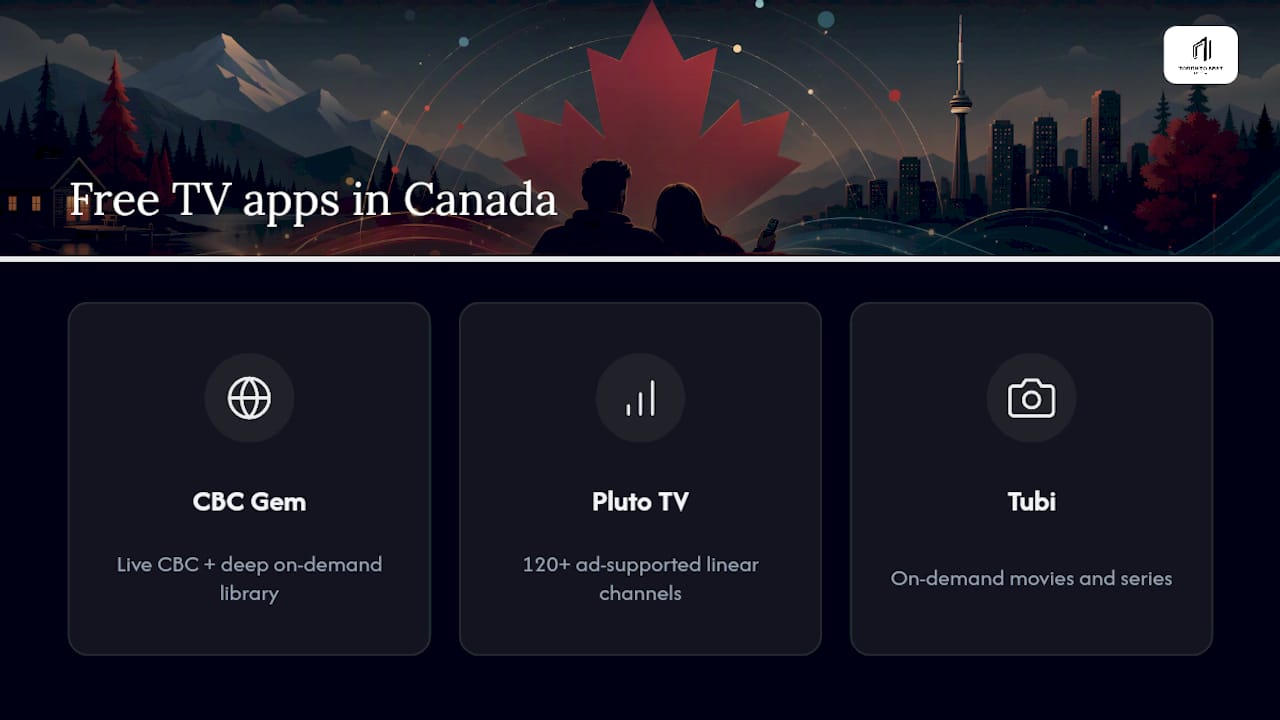
CBC Gem is the standout. It streams the main CBC channel live and for free, no cable login required, alongside a deep on-demand library of Canadian dramas, documentaries, and news. A paid premium tier strips out the ads and adds access to CBC News Network, which matters if you want rolling news coverage without commercial breaks. For a lot of households, CBC Gem alone replaces the single biggest reason people kept cable: the fear of missing local and national news.
The private networks work differently. CTV, Global, and Citytv apps generally give you next-day access to most shows rather than a live simulcast of their main channel, though some offer free live news streams during specific windows. That's a real trade-off worth knowing upfront: you'll catch the episode, just not the moment it airs, unless you pair the app with an antenna (more on that shortly).
Pluto TV and Tubi round out the free tier. Pluto TV runs more than 120 free, ad-supported linear channels in Canada, arranged like a cable guide you scroll through rather than search. Tubi leans more on-demand, with a large movie and series library. Both are genuinely free, no credit card, no trial period that quietly converts to a paid plan. The catch is exactly what you'd expect: ads interrupt playback, and the channel selection skews toward older content and lesser-known titles rather than the newest releases.
Pro Tip: Install CBC Gem, Pluto TV, and Tubi on your TV or streaming box before you touch anything else. It takes fifteen minutes, costs nothing, and immediately tells you how much of your current cable habit these three apps already cover.
For most households, combining these three covers the basics: national news through CBC Gem, casual browsing through Pluto TV, and movie nights through Tubi. What they don't cover well is live sports and guaranteed simulcast access to private network channels, which is where the paid tiers below start to matter. You can find more detail on stacking free options in this breakdown of free TV streaming in Canada.
What live TV streaming services replace cable channels in Canada?
If free apps leave gaps, live TV streaming services are the next step up, and they're built specifically to mimic the cable-guide experience rather than the on-demand library model.
StackTV, delivered through Amazon Prime Video Channels, bundles a large slate of Corus-owned channels, including Global, HGTV, Food Network Canada, and W Network, into a single monthly add-on. If you're already a Prime Video subscriber, StackTV slots in as one extra line item rather than a separate app and account to manage. It's a strong fit for households that want lifestyle and entertainment channels without hunting through five different apps for them.
RiverTV takes a different approach. It's built specifically for Canada and doesn't require a fixed postal code or cable-style installation, which makes it useful for renters, seasonal residents, or anyone who wants a curated live channel lineup without a long-term commitment. It won't have the sheer breadth of a full cable package, but for a household that wants a manageable set of live channels rather than a wall of five hundred options, that's arguably a feature rather than a limitation.
Beyond those two, general live-TV streaming services like Fubo Canada exist on a spectrum from sports-heavy to general entertainment, with pricing and device support that varies by tier. These services tend to work well on Roku, Apple TV, Chromecast, and smart TV apps, but it's worth checking your specific device before signing up. Community discussion boards, including this roundup of popular Canadian streaming picks, are a decent gut check on which services are actually reliable month to month versus which ones generate the most complaints.
The trade-offs to weigh before choosing any live-TV streaming service:
- Channel completeness. None of these fully replicates a top-tier cable package. You're trading total coverage for a curated slice that usually costs less.
- Device compatibility. Confirm the service runs on your actual TV or streaming box, not just "most smart TVs," before you subscribe.
- Simultaneous streams. Family households with multiple TVs running different shows at once need to check stream limits, since some plans cap you at one or two devices at a time.
- Regional coverage. A handful of channels are limited by region or blacked out during specific live events, which matters more for sports than for lifestyle content.
For households that want the cable-guide feel without picking through a dozen separate apps, this is usually where the cord-cutting decision actually lands, either with one of these skinny bundles or with an IPTV subscription that bundles a broader channel list into one login.
How do you get local channels without cable using an antenna?
An over-the-air antenna is the cheapest, most permanent piece of any cord-cutting setup, and it's the one option that costs nothing month to month once you've bought the hardware.
OTA broadcasts in Canada carry the major networks you'd expect: CBC, CTV, Global, and Citytv, all broadcasting in full HD, and often at a sharper picture than the compressed feed you'd get through a cable box or streaming app. That's not a marketing claim, it's just how broadcast signals work: less compression means a cleaner image, provided you're within range of a transmitter.
Setting up OTA reception is straightforward if you follow the right order:
- Check your distance from local transmitters using an online antenna-range tool before buying anything, since reception depends heavily on how far you are from the broadcast towers and what's between you and them.
- Choose indoor versus outdoor hardware. Urban apartments close to towers usually do fine with a flat indoor antenna. Suburban or rural homes farther from transmitters generally need a roof or attic-mounted outdoor antenna for reliable reception.
- Add a network tuner if you want DVR functionality. A device like HDHomeRun converts the OTA signal into an IP stream your home network can distribute to every TV in the house.
- Pair the tuner with Plex or Jellyfin to record and organize live broadcasts, effectively building a whole-home DVR system without a cable box or monthly recording fee.
The limitations are real, though. Range and weather both affect signal quality, heavy snow or wind can knock out reception temporarily, and a handful of specialty and cable-only channels simply aren't broadcast over the air at all. For a deeper walkthrough on maximizing local channel access, this guide on streaming local channels in Canada covers app-based backups for the channels an antenna can't reach.
Pro Tip: Buy a cheap antenna before an expensive one. A $30 indoor model tells you within a day whether your location gets strong reception, and you can always upgrade to a roof antenna later if the signal is weak.
What devices and internet speed do you need to stream TV reliably?
Your streaming setup is only as good as the weakest link in the chain, and that's usually either an outdated TV or an internet plan that wasn't built for four people streaming 4K at once.
Smart TVs come with apps built in, but older models often lag behind on newer Canadian services, especially anything released in the past couple of years. A dedicated streaming device like Roku, Apple TV, Chromecast, or a Google/Android TV box costs roughly $30 to $200 and instantly modernizes an older television without replacing it. If your five-year-old smart TV keeps freezing on load screens or missing app updates, a streaming stick solves that problem for less than the cost of one month of cable.
Bandwidth matters more than most people realize until they hit a wall. Standard definition needs relatively little, HD streams need noticeably more, and 4K content demands a fast, stable connection, especially once you factor in multiple people streaming different things on different devices at the same time. If your household regularly has two or three screens running simultaneously, budget your internet plan accordingly rather than assuming your current connection will handle the extra load.
A few practical notes worth flagging before you commit to a streaming-heavy household:
- Data caps are still common on some Canadian ISP plans, and streaming video, especially in 4K, adds up fast over a month of daily use.
- CGNAT issues show up with satellite internet like Starlink or some smaller regional ISPs, occasionally interfering with certain streaming or remote-access setups. Tools like Tailscale or Cloudflare Tunnel can work around this for anyone running home-network gear like an HDHomeRun remotely.
- Ethernet over Wi-Fi for your main streaming device eliminates buffering caused by wireless interference, particularly in older homes with thick walls.
- Mesh Wi-Fi systems are worth the investment for larger homes or cottages where a single router can't reach every room reliably.
Get the hardware and bandwidth right first, and everything downstream, apps, live TV, sports, stops being a guessing game.
How do Canadians watch live sports and news without cable?
Sports is where cord-cutting gets complicated, because Canadian broadcast rights are split across several services rather than bundled into one.
DAZN covers NFL games and a significant chunk of international soccer rights in Canada, making it the go-to for football fans and soccer viewers who want streaming-first access rather than a traditional broadcast package. Sportsnet+ and TSN hold various Canadian rights across NHL, MLB, and CFL, and pricing for sports-focused subscriptions generally runs somewhere between $20 and $45 a month depending on which tier and sport you're after. That's a meaningful cost on its own, so it's worth being precise about which teams and leagues you actually follow before subscribing to more than one sports service.
Regional blackouts are the other wrinkle. Some games are restricted based on your location, particularly in-market broadcasts tied to a specific team's home region, which can mean a streaming subscription doesn't guarantee you'll see every game your favourite team plays. This isn't unique to any one service. It's a structural feature of how sports broadcasting rights are sold, and it applies whether you're watching through cable, a streaming app, or an IPTV subscription.
For news, the free tier does most of the heavy lifting. CBC Gem streams national news live at no cost, Global News runs a free channel on YouTube, and Pluto TV carries dedicated news channels alongside its entertainment lineup. None of these require a subscription or a login tied to a cable provider, which makes them a reasonable default even for households that do pay for sports elsewhere.
A practical mix looks something like this for most sports-first households:
- Casual fans who follow one or two teams loosely can often get by with free news apps plus occasional single-game passes rather than a full season subscription.
- Dedicated hockey fans typically need Sportsnet+ or TSN depending on which teams they follow, since NHL rights are split rather than unified under one service.
- NFL and soccer fans lean on DAZN, which centralizes those specific rights in Canada rather than splitting them across multiple apps.
- Households chasing broad live sports access across multiple leagues often find a live-TV bundle or IPTV subscription more economical than stacking three or four separate sports apps individually.
If your household leans heavily toward live sports, this guide on streaming NHL games on an Android TV box walks through one practical setup for hockey-focused viewers.
What does it actually cost to replace cable in Canada?
Realistic monthly ranges depend almost entirely on how much live sports and full-channel access your household needs, and the spread is wide.
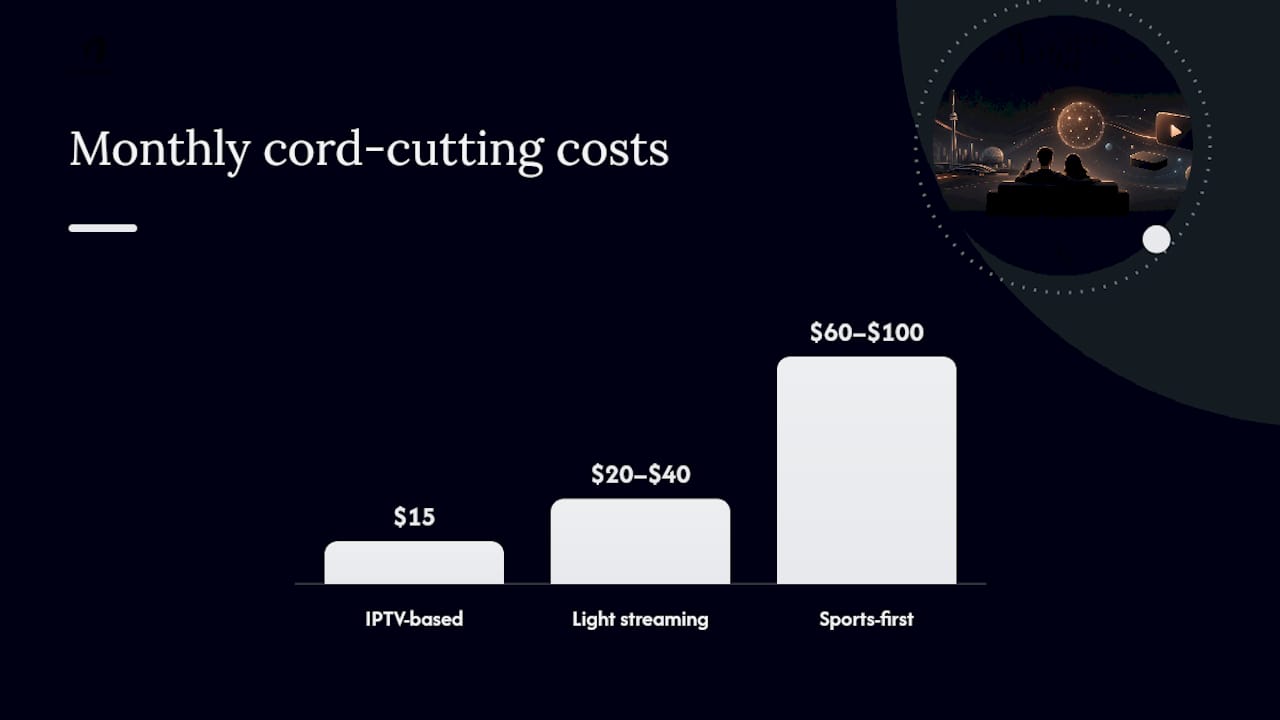
A free-only setup, running CBC Gem, Pluto TV, and Tubi with nothing else, costs $0 a month but leaves gaps in live sports and some private-network simulcasts. A light streaming stack adding one or two paid apps like Crave or Disney+ typically lands somewhere in the $20 to $40 range monthly. A sports-first household layering in DAZN, Sportsnet+, or TSN on top of streaming apps can push past $60 to $100 a month depending on how many sports services get stacked together. An IPTV-based setup, by contrast, often consolidates most of that live-channel need into a single monthly subscription, which is where plans starting around $15 a month become relevant for households trying to simplify rather than stack five separate bills.
There's also a one-time cost layer that's easy to forget: an antenna, an HDHomeRun tuner, or a streaming device are all upfront purchases rather than recurring fees, which means your first month of cord-cutting can look more expensive than it actually is once you average the hardware cost across a year or two of use.
The audit method that actually works is simple:
- List every subscription you currently pay for, cable included, with its exact monthly cost.
- Calculate a rough per-channel cost for your cable bill by dividing the total by the channels you genuinely watch, not the number listed on the package.
- Map each habit to a replacement, matching specific shows or channels to the free or paid app that actually covers them.
- Rotate free trials strategically, timing a service's trial period to a specific sports season or show release rather than letting it run year-round unnecessarily.
Combining free apps with one or two targeted paid services typically cuts monthly TV spend substantially compared to a traditional cable bundle, and a comparison against your current cable invoice usually makes the savings obvious within the first billing cycle. For a side-by-side look at how the numbers stack up, this IPTV versus cable comparison breaks down typical Canadian pricing in more detail.
How do you choose the right cable-free setup for your household?
Choosing the right stack comes down to answering a short list of questions honestly, rather than picking whatever service a friend recommended.
- Audit your actual viewing habits first. Write down what you watched over the past two weeks, not what you think you watch. Most people are surprised by how few channels they actually use regularly.
- Rank live sports and local news against on-demand content. If neither matters much to your household, free apps and one streaming service will likely cover everything. If both matter, budget for a dedicated sports service and either OTA or a live-TV bundle.
- Check the technical checklist before subscribing to anything: number of simultaneous streams allowed, which devices are officially supported, how long the trial period runs, whether cancellation is easy or buried in a phone call, and whether your region gets full channel coverage.
- Watch for red flags in a service's description, vague language about "select markets," trial periods that auto-convert to annual plans, or device support that only lists "most smart TVs" without naming yours specifically.
- Run a short test before committing. A 48 to 72 hour trial of your top choice, evaluated strictly against the checklist above, tells you more than any review article will.
The pattern that shows up most often in successful cord-cutting switches is starting with an honest audit and replacing only what people actually watch, rather than trying to recreate the entire cable experience channel-for-channel. Chasing full parity with your old cable package is usually a losing game. Chasing coverage for the dozen shows and channels you genuinely used is a winning one.
How fast can you actually cut the cord in Canada?
A weekend is genuinely enough time to test a cable-free setup, provided you follow a specific order rather than trying everything at once.
-
Day zero: audit and pick one test stack. Decide whether you're testing free apps plus an antenna, free apps plus a two-week trial of a paid live-TV service, or a two-day IPTV trial. Don't test all three simultaneously. Pick one path so you can judge it clearly.
-
Day one: install and verify. Set up any hardware (antenna, streaming device, or IPTV box), confirm your internet speed can handle simultaneous streams, install your chosen apps and trials, and specifically test local news and one live sporting event to check for lag or dropouts.
-
Day two: assess honestly. Check picture quality, how the device behaves under normal household use, whether simultaneous streams hold up when more than one person is watching, and whether anything felt noticeably worse than cable.
-
Follow-up: decide and act. If the test stack covers what you need, cancel cable, and check whether switching internet plans makes sense now that you're not paying for a bundled cable line. Track what you save over the first three months to confirm the switch was worth it.
For step-by-step setup help on specific devices, guides on activating IPTV on an Android TV box, setting up IPTV on Roku, or activating IPTV on Apple TV walk through the exact clicks for each platform.
When does a Canadian IPTV subscription make more sense than stacking apps?
IPTV earns its place in this conversation when a household wants one bill, one login, and a genuinely wide live-channel lineup, rather than juggling four or five separate app subscriptions and remembering which login goes with which service.
An IPTV service operating out of Toronto since 2016 addresses this problem by offering technology designed to keep load times fast and buffering minimal, which is important during live sports events where lag can impact viewing. Pricing options start at a low monthly rate, and the channel lineup covers Canadian, American, and international content, including kids' and educational programming, which covers more ground than many bundles typically do. A short free trial lets you test the service before committing, aligning with the audit-and-test approach recommended throughout this guide.
This option is best suited for someone seeking the convenience of one subscription and one remote without a cable contract, and who values having accessible local support for troubleshooting.
Before subscribing to any IPTV provider, verify a few specifics:
- The actual channel list for your priorities, sports, news, kids' content, rather than assuming "hundreds of channels" covers what you personally watch.
- Device compatibility with whatever hardware you already own, or whether you'll need a pre-configured box.
- Trial limits and refund policy, spelled out clearly before you enter payment information.
- Setup support availability, especially if you're not confident configuring a new device yourself.
Pro Tip: Test an IPTV trial the same way you'd test a live-TV streaming service: watch one live sports broadcast, one news simulcast, and one on-demand title, all in the first hour. That combination tells you almost everything about reliability before you commit a full subscription payment.
Which cable-free stack fits your household?
Households fall into roughly three camps, and each one points toward a different starting stack.
Minimal viewers, people who watch the news, maybe one weekly drama, and not much else, should start with CBC Gem, Pluto TV, and Tubi and stop there unless something's clearly missing. Balanced households wanting a broad mix of entertainment and some live channels tend to land best with either StackTV or an IPTV subscription, since both replicate the cable-guide feel without the cable contract. Sports-first households need the most deliberate planning, because rights are split across DAZN, Sportsnet+, and TSN, and stacking too many of them individually erases the savings that made cord-cutting worthwhile in the first place.
My honest recommendation, based on everything above, is to resist subscribing to anything the same week you cancel cable. Test first. A weekend audit costs you nothing but time, and it tells you exactly where the real gaps are instead of guessing. The trade-offs are consistent across every option: cost drops, picture quality on OTA often improves, but live sports access requires more deliberate choices than it did when one cable bill covered everything automatically.
— Aj
Try Toronto's Best IPTV before you commit to anything else
Toronto's Best IPTV is the alternative to stacking five separate streaming subscriptions in Canada: one login, Canadian edge routing built to cut buffering during live NHL and NFL games, and plans starting at just $15 a month instead of a cable-sized bill.
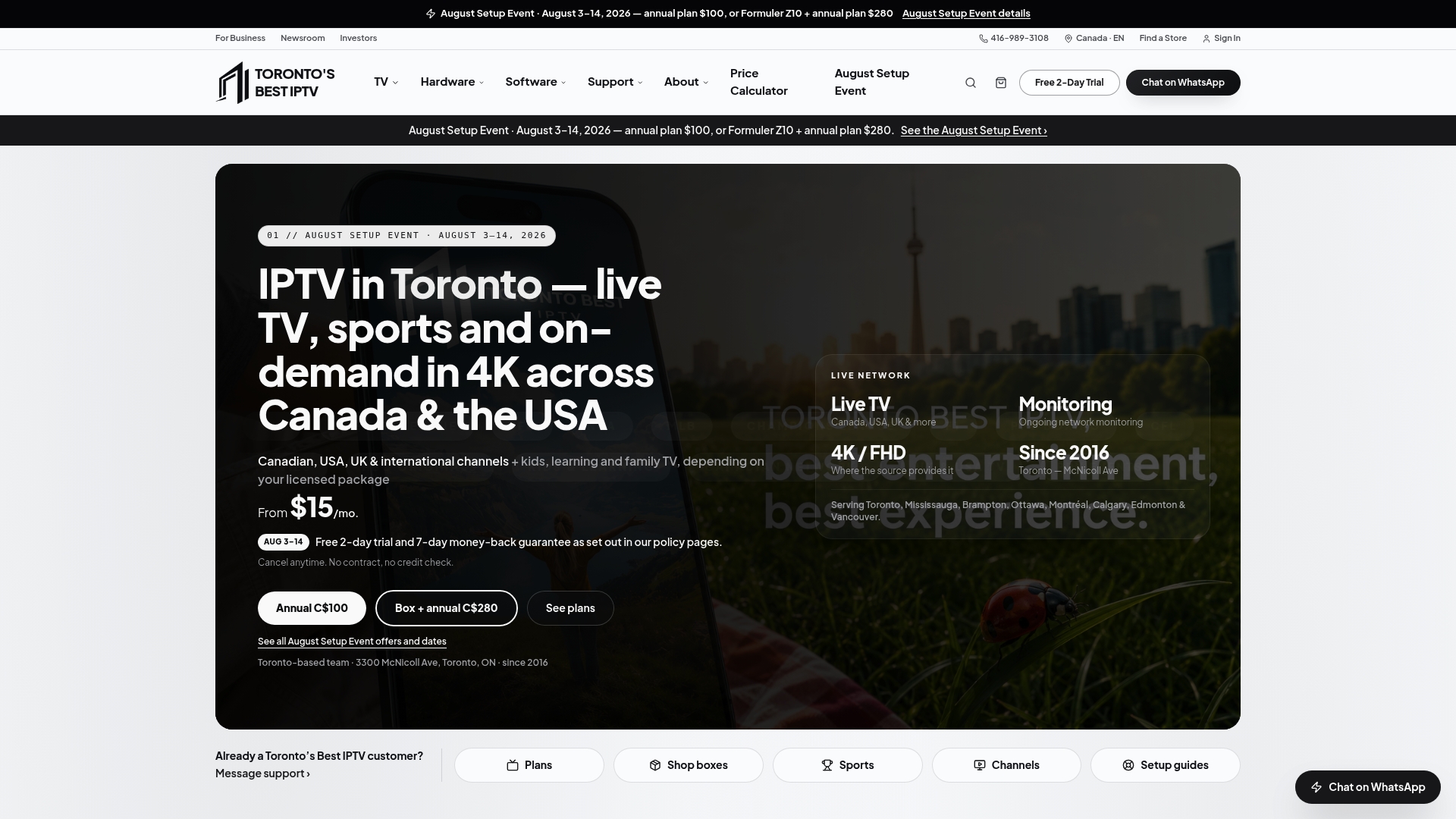
The channel lineup spans Canada, the US, and international content, including multilingual channels and kids' and educational programming, so households that need more than one language or more than one type of viewer covered aren't stuck piecing together four different apps to get there. Setup support comes from a local Toronto team that's been doing this since 2016, which matters if you'd rather call someone than troubleshoot a streaming box alone at 9 p.m. on a Sunday before the game.
If you've already tested the free apps and an antenna and you're still missing live channels or full sports coverage, the two-day free trial is the logical next step. Read the full breakdown on the what is IPTV page, then start your trial and see how it compares against whatever stack you've been testing this week.
Sources
A handful of direct links cover most of what you'll need to get started without cable in Canada:
- What can I live stream on CBC Gem
- Cutting the Cord in Canada: The 2026 Playbook
- Best Cable Alternatives in Canada in 2024 – Top 11 Options
- Guide to streaming in Canada
FAQ
What is the best way to watch TV without cable in Canada?
There's no single best way. Most Canadian households do best combining free apps like CBC Gem and Pluto TV with either an OTA antenna, a skinny bundle like StackTV or RiverTV, or an IPTV subscription, depending on how much live sports and full-channel access they need.
What is the best TV option without cable?
For broad live-channel coverage in one subscription, an IPTV service or a live-TV streaming bundle like StackTV typically comes closest to replicating cable, while free apps handle news and casual viewing at no cost.
Is there a way to watch free cable TV in Canada?
You can't stream a full traditional cable lineup for free, but CBC Gem streams the main CBC channel live at no cost, and Pluto TV and Tubi add large free ad-supported libraries on top of that.
Is there a TV that works without cable?
Any smart TV with built-in apps, or an older TV paired with an affordable streaming device like Roku or Apple TV, works fine without a cable subscription, provided you have a reliable internet connection.