
Standard definition IPTV typically uses roughly around 0.7 to 1.1 GB per hour, HD around 1.4 to 2.3 GB, and 4K commonly ranges from about 6 to 11 GB per hour. The two levers that matter most: your stream's resolution and codec, and whether apps keep pulling data in the background when you're not even watching. Fix those two things first, and most cap worries disappear.
TL;DR:
- Background app activity like EPG polling and catch-up preload can significantly increase data usage, especially on capped or mobile plans.
- Watching sports and high-motion content requires higher bitrates, which can push data use well above the baseline estimates.
- A household watching 3 hours daily with mixed quality streams may consume about 225 GB per month, while heavy users can exceed 1,200 GB.
- Testing actual data usage with router logs during a trial period provides the most accurate assessment for your household's specific IPTV needs.
Table of Contents
- How much data does IPTV use per hour by quality
- What actually drives your IPTV bandwidth consumption up
- Calculate your monthly IPTV data usage in three steps
- What internet speed do you actually need for IPTV
- How to cut IPTV data usage without wrecking picture quality
- How Toronto's Best IPTV helps you test this before you commit
- The part everyone gets backwards about IPTV data
- Sources
How much data does IPTV use per hour by quality
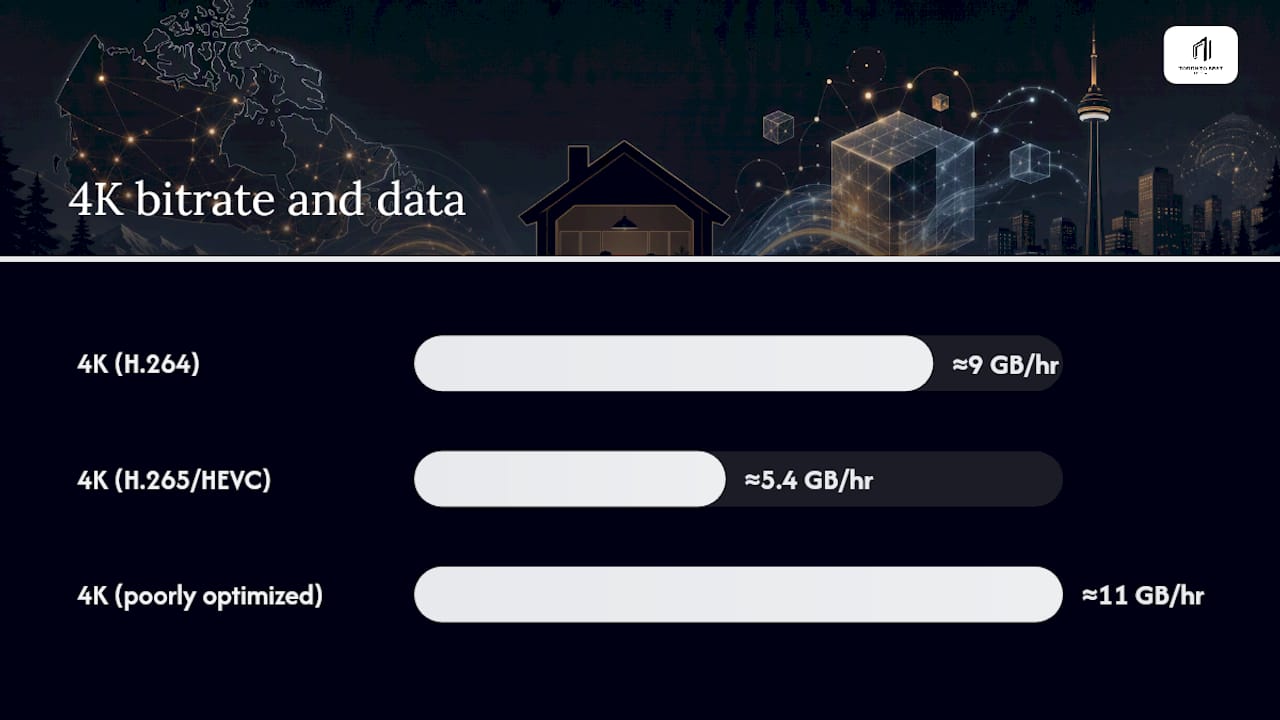
The honest answer is "it depends on bitrate," but bitrate almost always maps to the quality tier you've selected. SD streams run light because they're encoding fewer pixels and less motion detail. Push up to 1080p and you're roughly tripling the data draw of SD. 4K is the wild card. Depending on the codec and how aggressively the provider compresses the stream, 4K can land anywhere from a very manageable 6 GB/hr to well over 11 GB/hr on a poorly optimized feed.
Here's how the numbers typically break down, based on real-world IPTV bandwidth measurements:
| Quality tier | Typical bitrate | Data per hour |
|---|---|---|
| SD | 2–4 Mbps | 0.7–1.1 GB |
| HD (720p) | 4–5 Mbps | 1.4–2.3 GB |
| 1080p (Full HD) | 8–12 Mbps | 1.4 to 2.3 GB |
| 4K UHD | 15–25 Mbps | 6–11 GB |
Converting Mbps to GB per hour is simple math: multiply the bitrate by 3,600 seconds, then divide by 8 (to go from bits to bytes), then divide again to get gigabytes. A 10 Mbps stream works out to roughly 4.5 GB per hour.
Codec choice changes everything here. H.265, also called HEVC, cuts bitrate by roughly 30 to 50% compared to the older H.264 codec while keeping picture quality nearly identical. That's why two devices watching the same 4K channel can post wildly different GB totals: one is HEVC, one isn't.
What actually drives your IPTV bandwidth consumption up
Table numbers are a starting point, not a guarantee. Real usage swings based on what you're watching and how your setup behaves in the background.
- Sports and other high-motion content need more bits per second to render fast movement cleanly, so a hockey game will always cost more data than a static news broadcast at the same resolution.
- Rebuffering forces the app to refetch video segments it already partially downloaded, which quietly inflates your total GB used without adding any extra watch time.
- Background EPG polling and catch-up preloads can consume data even when the TV is off, since the app keeps refreshing guide data and pre-caching content.
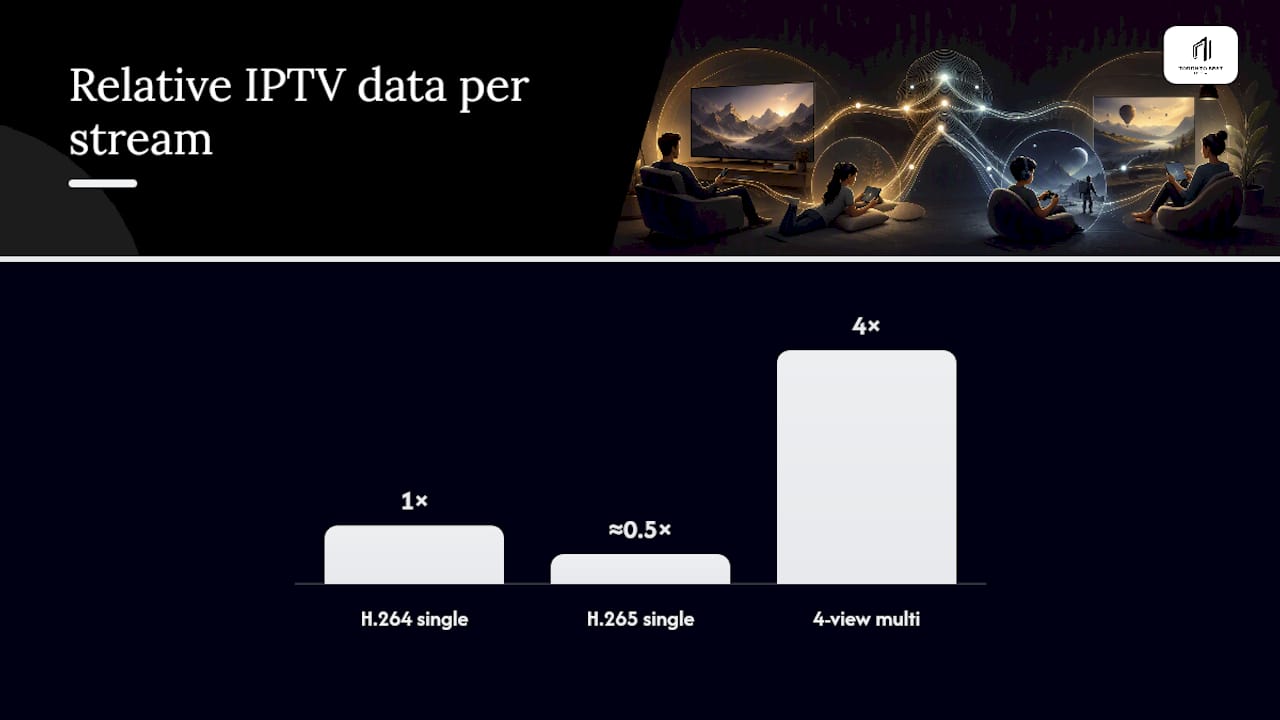
- Running multiple simultaneous streams, including multi-view for split-screen sports, multiplies your GB use by the number of active feeds.
- Encoder settings like keyframe interval and bitrate ceiling can shift consumption noticeably even within the "same" quality tier.
Rebuffering and packet loss don't just annoy you. Fixing network configuration and QoS settings can reduce both wasted data and buffering complaints, because a stable connection means segments load once instead of three times.
Calculate your monthly IPTV data usage in three steps
The formula is straightforward: GB per hour × hours watched per day × days per month × number of concurrent streams. Once you plug in your own habits, the ISP cap conversation gets a lot less abstract.
- Light viewer: 1 hour/day of HD (roughly 2 GB/hr) × 30 days = about 60 GB monthly.
- Average household: 3 hours/day of mixed SD and 1080p (call it 2.5 GB/hr blended) × 30 days = roughly 225 GB monthly.
- Heavy user: 5+ hours/day including sports and 4K (say 8 GB/hr average) × 30 days = 1,200 GB or more, especially with a second stream running.
Most Canadian broadband plans don't cap data hard the way mobile plans do, but some ISPs apply a fair use policy once you cross a certain threshold, and Execulink's own consumer guidance shows how quickly a household with two or three screens running can climb past 300 GB a month. Mobile hotspots are the real danger zone. A single 4K hour on a phone plan can eat through a daily allotment that was meant to last all week. If you want to skip the mental math entirely, an IPTV data usage calculator will do the multiplication for you.
What internet speed do you actually need for IPTV
Data usage per hour tells you the total cost, but sustained speed tells you whether the stream will play without stuttering. IPTV bandwidth guidance generally recommends these sustained speeds, with headroom built in for other devices on the network:
- SD: 3–5 Mbps sustained
- HD/720p: 6–8 Mbps sustained
- 1080p: 12–15 Mbps sustained
- 4K: 25–35 Mbps sustained, especially with a second device active
Testing speed from the streaming device itself, not your phone in another room, gives you the number that actually matters, since Wi‑Fi signal strength varies by location and device. Wired Ethernet beats 5 GHz Wi‑Fi, which beats 2.4 GHz Wi‑Fi, in that order, every time.
Pro Tip: Add 20 to 30% headroom on top of the minimum speed for your quality tier. That buffer absorbs household Wi‑Fi congestion without dropping your stream into a lower bitrate mid‑show.
For a deeper breakdown of router settings and QoS prioritization, see what internet speed live TV actually needs.
How to cut IPTV data usage without wrecking picture quality
You don't need to downgrade to SD forever to protect your data cap. A few targeted changes do most of the work.
- Switch to a lower-resolution stream on metered or mobile connections. 1080p on a phone screen is often wasted resolution anyway.
- Use HEVC-capable devices and provider streams wherever available. This is one of the most underused fixes, since switching to H.265 hardware can cut your per-hour data draw nearly in half while the picture looks the same to most viewers.
- Close the app when you're not watching. Leaving it open in the background lets EPG polling and catch-up preloads run unchecked.
- Skip multi-view on capped connections. Splitting your screen into four sports feeds multiplies your data cost by four.
- Track usage per device. Your router's admin panel or the streaming app's own diagnostics screen will usually show a running data tally.
Pro Tip: If your provider offers both H.264 and H.265 versions of the same channel, always pick H.265. You'll barely notice the quality difference, but your monthly GB total will.
For a step-by-step walkthrough, check proven ways to cut streaming data usage, and if you're specifically chasing 4K without the data penalty, 4K streaming requirements covers the hardware side.
How Toronto's Best IPTV helps you test this before you commit
Numbers on a page are useful, but nothing beats watching your own router logs during a real viewing session. A two-day free trial is offered, which gives you enough time to stream a live hockey game, flip through a few VOD titles, and check your actual GB draw against your ISP's plan limits before you spend a cent. Plans start at a modest monthly cost, with edge routing designed to reduce buffering during high-demand moments.
If you're trying to figure out whether a single connection or multiple devices makes more sense for your household, the IPTV pricing calculator breaks down cost by device count, which pairs naturally with the data math above. Run your trial period like a test lab: watch what you'd normally watch, note the GB used, and decide from real numbers instead of guesswork.
The part everyone gets backwards about IPTV data
Most advice on this topic obsesses over resolution and ignores the app behaviour sitting quietly in the background. Dropping from 1080p to HD saves you maybe a gigabyte an hour. Leaving catch-up preloads and EPG polling running unchecked for a week can cost you more than that without a single minute of active viewing. The resolution conversation gets all the attention because it's the easy, visible lever. The background data drain is the one nobody checks.
If I had to rank priorities for someone worried about a data cap, codec comes first, not resolution. Switching to an HEVC-capable stream keeps the picture you actually want while cutting the bitrate that's costing you. Only after that would I touch resolution settings, and only on mobile or genuinely tight connections. The conventional wisdom of "just watch in SD to save data" solves the wrong problem for most households, because it sacrifices the viewing experience you're paying for instead of fixing the codec mismatch or the idle app that's actually draining your allowance.
Test it yourself before assuming anything. Your router logs will tell you more in one week than any table in this article.
— Aj
Sources
- IPTV Bandwidth Requirements: How Much Do You Need? (2026)
- Bandwidth requirements for streaming and IPTV network optimisation — Infomir
- How Much Internet Do Streaming Services Use? — Execulink Telecom