

IP-based blackouts are the ones you can usually work around with a VPN or Smart DNS tool. Billing locks, GPS checks, and national broadcast exclusives are a different story, and most tricks fail against them. Your first move is a quick diagnosis: run an IP lookup, check the streaming service's help page for its blackout policy, and confirm whether CRTC rules or a national rights deal explain the block. From there, you'll know whether a workaround is worth trying or whether an authorised package (or a service like Toronto's Best IPTV) is the smarter route.
TL;DR:
- VPNs reliably unblock IP-based blackouts but do not address GPS checks, billing address verification, or national exclusivity restrictions.
- Differential enforcement methods mean some services verify location via apps or billing info, which VPNs alone cannot bypass.
- Correctly diagnosing the blackout type is crucial; a VPN works only for IP geo-blocks, not for billing locks or national rights restrictions.
- Subscribing to authorized regional packages or specialized IPTV services offers a more consistent solution than technical workarounds.
- Improper use of workarounds risks account suspension, payment issues, or ineffective access if the blackout is due to licensing instead of geolocation.
Table of Contents
- Why sports blackouts happen and how they're enforced
- Common workarounds and how reliably each one actually works
- Which blackout type are you actually facing?
- Setting up the workaround on your actual device
- What you're risking if you try a workaround
- Where Toronto's Best IPTV fits into this picture
- Our take: stop treating this like a hacking problem
- Watch every game without the blackout guesswork
- Sources
- FAQ
Why sports blackouts happen and how they're enforced
Blackouts aren't a glitch. They're the direct result of a business deal, and once you understand the deal, the restriction stops feeling random.
Broadcasters pay for the exclusive right to air a game in a specific territory. The CRTC explains that a broadcaster has to buy the rights to televise a sporting event in the areas it serves, and if it hasn't purchased those rights for a given region, it's often contractually required to black out the game there rather than air it anyway. That's why a Blue Jays game can vanish from MLB.TV for Canadian viewers even though you're paying for the service. Sportsnet holds the national broadcast rights in Canada, so MLB.TV blacks out every Blue Jays game across the entire country, not just in Toronto, according to VPNRank's breakdown of the 2026 blackout map.
Think of it like a movie theatre franchise. The studio doesn't let every theatre chain show the same blockbuster in the same city at the same discount price. It sells territorial rights, and whoever buys them gets exclusivity. Sports leagues do the same thing with broadcasters, except the "territory" is drawn with GPS coordinates and IP address ranges instead of postal codes.
The four things streaming services check
According to LegalLine's explainer on broadcasting rights in sports law, blackouts get enforced at two main levels: your IP address's geolocation, and in some cases the billing address tied to your subscription. Layer in what device-specific research from VPNRank and CordCutterPro has found, and four distinct enforcement signals emerge:
- IP geolocation. The service checks where your connection appears to originate and compares it against the blackout map for that game.
- Billing or account address. Some platforms, DAZN among them, tie your subscription to the address on file regardless of what IP you're connecting from.
- App-level GPS. Mobile apps for leagues like MLB and the NBA often pull your phone's actual location data, which a VPN alone doesn't touch.
- National exclusivity locks. These aren't really "blocks" in the technical sense. They're a flat refusal to stream the content in a territory at all, because a different broadcaster owns it there.
The practical upshot: a VPN that changes your visible IP address does nothing to your billing profile or your phone's GPS chip. Services increasingly cross-reference two or three of these signals at once specifically because IP spoofing became common enough to notice. That's why the same VPN server that unblocks an NFL game on your laptop browser might get flagged instantly inside the league's own mobile app.
Common workarounds and how reliably each one actually works
Not every method attacks the same problem, which is exactly why "just use a VPN" is such incomplete advice. Here's what each approach actually does, and where it tends to fall apart.
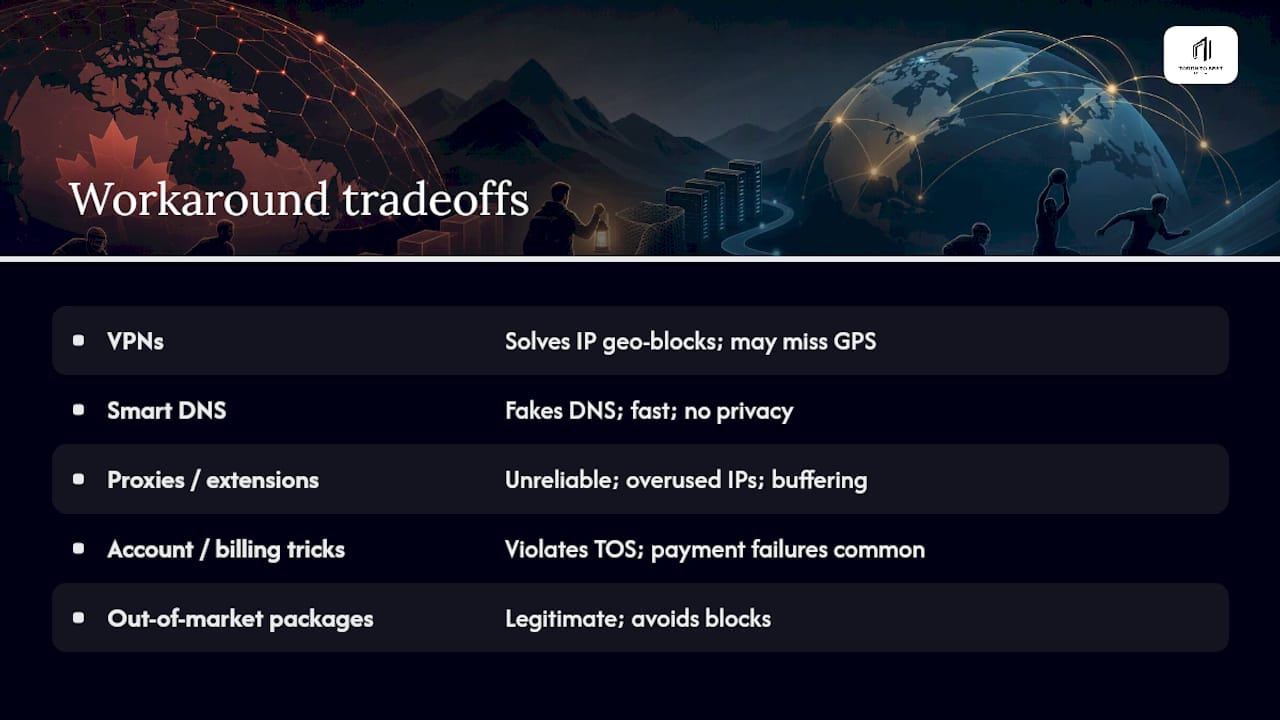
VPNs. A VPN reroutes your traffic through a server in another location, which changes the IP address the streaming service sees. This is the single most effective fix for a pure IP geo-block, and DevRunners' guide to streaming sports abroad identifies IP geo-blocks as the only one of four common block types that a VPN reliably solves. The catch is everything downstream of the IP: your billing address stays the same, and if the app checks GPS, the VPN is irrelevant. Detection has also improved. Streaming platforms maintain lists of known VPN server ranges and block them outright, which means the free or budget server you picked might already be flagged.
Smart DNS / MediaStreamer services. These reroute only the DNS requests that reveal your location, leaving the rest of your traffic unencrypted and untouched. That makes them faster than a full VPN and, critically, usable on devices like older smart TVs or streaming boxes that don't support VPN apps at all. The tradeoff is that Smart DNS offers zero privacy benefit since your ISP and the streaming service can still see exactly what you're doing. It's a location trick, not a security tool.
Proxies and browser extensions. These are the least reliable option on this list. Free browser proxies tend to run on overused IP ranges that get blacklisted fast, and they typically don't handle video streaming traffic cleanly, leading to buffering or outright failure mid-stream. If you're already going to the trouble of downloading software, a proper VPN client is a better use of your time.
Account and billing tricks. Creating a foreign billing address or a second account tied to a different country's payment method sits in a riskier category. It's not a technical workaround so much as a misrepresentation of where you live, and it's the kind of thing that violates a platform's terms of service more explicitly than a VPN does. Payment failures are common too, since many services reject cards issued in a country that doesn't match the billing address.
Travel and official out-of-market packages. If you're actually in a different territory, buying that region's package is completely legitimate and sidesteps the whole cat-and-mouse problem. Android Police's commentary on VPN limitations makes the point directly: the relationship between broadcasters and VPN providers is a constant back-and-forth, with each side adapting to the other, while simply purchasing legitimate out-of-market access sidesteps the whole fight. It's also worth knowing that outside the US, several services already carry blackout-free international rights packages, so a workaround isn't always necessary in the first place, per DevRunners' research.
IPTV services. An IPTV subscription delivers live channels over standard internet protocol rather than through a single geo-restricted app, which means your access depends on the channel package you've bought rather than on spoofing your location game by game. For Canadian sports fans juggling NHL, NFL, and international leagues across multiple blacked-out apps, a service like Toronto's Best IPTV's sports lineup consolidates that access into one subscription instead of five workarounds.
Pro Tip: Before you commit to any paid VPN plan, test it on the exact device and exact app you'll actually be watching on. A VPN that unblocks a game beautifully in a desktop browser can fail completely inside a mobile app that checks GPS, so don't assume success on one screen means success everywhere.
Which blackout type are you actually facing?
Before you spend money on a VPN subscription, spend five minutes diagnosing what's actually blocking you. DevRunners categorizes blackouts into four distinct types, and only one of them responds reliably to a VPN.
- Test for an IP-only block. Open an IP lookup tool and confirm your detected location. If it matches your real address and the stream is blocked, try a VPN server in a nearby city outside the blackout zone. If that unblocks the game, you were dealing with a straightforward IP geo-block, the easiest type to solve.
- Test for a billing or account lock. Switch to a private browser window with the VPN active, and log in fresh rather than relying on a saved session. If the stream still recognizes you as being in the blackout region despite the new IP, the service is likely checking your billing address or account profile rather than your connection. DAZN is a commonly cited example of this behaviour. This type generally isn't solvable with a VPN, and buying the correct regional package is the realistic fix.
- Test for an app-based GPS block. Try the same content on a desktop browser instead of the mobile app. If the browser version works with a VPN but the app still blocks you, the app is almost certainly reading your phone's GPS chip directly, a pattern VPNRank's testing flags repeatedly for mobile sports apps. The workaround here is to watch on a non-GPS device, like a laptop or a smart TV, rather than the phone app itself.
- Test for a national exclusive. If no combination of VPN, private window, or device swap changes anything, and the content simply isn't offered in your country's package at all, you're looking at a full national rights exclusive. This is a business arrangement, not a technical gate, and no workaround bypasses it. Your options are an authorised international package if one exists, or waiting for archived footage after the live window closes.
Once you know which category you're in, a short troubleshooting pass usually clears up the remaining false negatives. Clear your browser cache and cookies before retesting, since a stale session can hold onto your old location even after you've connected to a new VPN server. Run a DNS and WebRTC leak test, because a leak can broadcast your real IP address even while the VPN reports a different one. Switch to a different city inside the same country if your first server gets flagged. And double check that you've picked a location that's actually outside the blackout zone. "Outside your home province" isn't always enough. Some exclusives, like the Blue Jays' MLB.TV blackout, cover the entire country.
Setting up the workaround on your actual device
The right tool depends heavily on what screen you're watching on, and this is where most people get tripped up. A method that works flawlessly on a laptop can fail entirely on a phone or a streaming box.
Desktop and laptop browsers
- Clear your browser's cookies and cached site data for the streaming service before you start. A saved session token can override a new IP address and keep showing you the blackout.
- Open a private or incognito window, then connect your VPN to a server in a city outside the blackout territory.
- Confirm the change actually took by running an IP lookup tool in that same private window. Don't skip this step. It catches the times a VPN app says "connected" but the traffic hasn't actually rerouted.
- Check for WebRTC leaks specifically. Browsers can leak your real IP through WebRTC even with a VPN active, which is one of the more common reasons a correctly configured VPN still shows a blacked-out stream, according to VPNRank's testing notes.
- Log into the streaming service fresh and test playback before the game starts, giving yourself time to troubleshoot if it doesn't work.
Smart TVs and Fire TV devices
Most smart TVs and streaming boxes simply don't support installing a VPN app directly, which is where Smart DNS earns its keep. A MediaStreamer-style service reroutes your DNS settings at the device or router level without requiring an app at all, and it's noticeably faster since it doesn't encrypt your whole connection. The other route is running the VPN at the router level, which covers every device on your home network at once, including smart TVs, game consoles, and IPTV boxes. Router-level VPNs take more setup effort but they're the only way to guarantee a device with no VPN app support gets covered.
Mobile apps (iOS and Android)
This is the trickiest category. League apps for MLB, the NBA, and others frequently check your phone's actual GPS location as a secondary signal, independent of your IP address. A VPN changes the IP; it does nothing to the GPS chip. If a VPN alone isn't clearing the block inside the app, your realistic options are watching through the mobile browser instead of the native app, or switching to a device that doesn't report GPS data at all, like a laptop or smart TV.
Pro Tip: When picking a VPN server for live sports, pick the closest city outside the blackout zone rather than the farthest one. Distance adds latency, and for a live game, a few extra seconds of buffering during a goal or touchdown is the difference between watching it live and reading about it on your phone first.
Wired ethernet connections also matter more for live sports than for on-demand shows, since a live broadcast has no buffer to fall back on if your Wi-Fi drops packets. If your router supports it, plug in directly for anything you're watching in real time.
What you're risking if you try a workaround
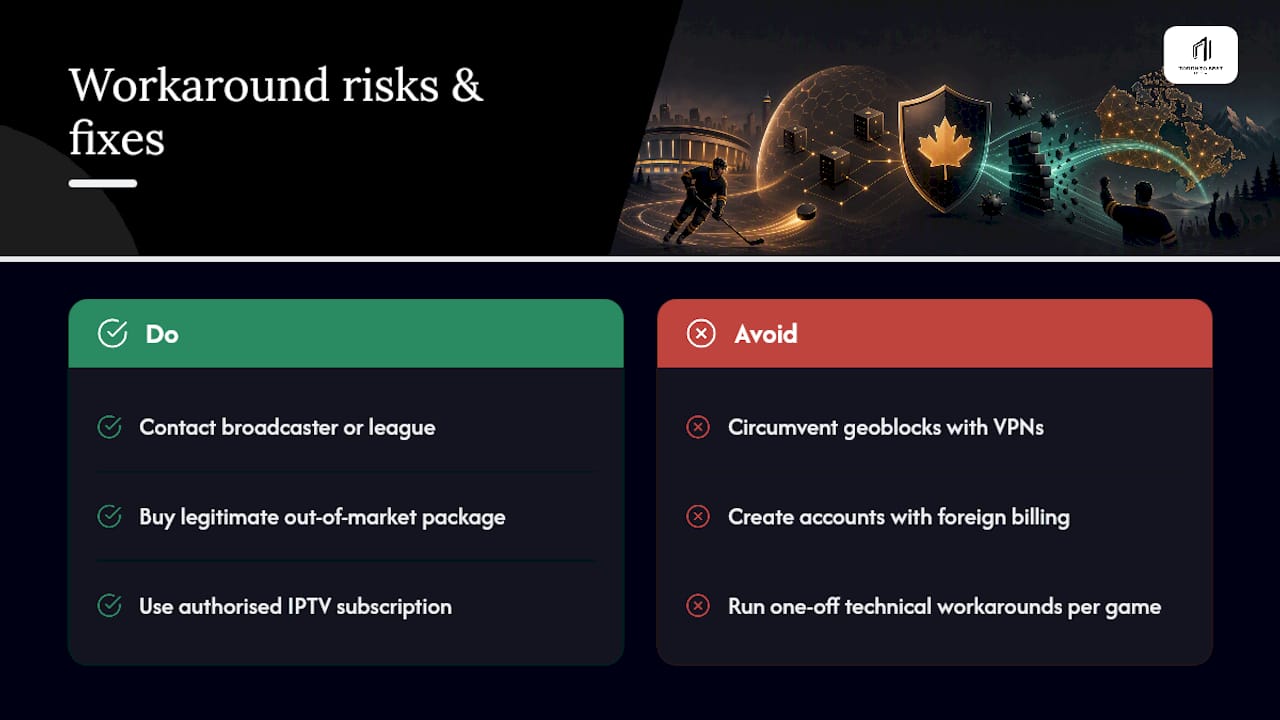
Streaming services generally reserve the right to suspend or terminate accounts that circumvent geographic restrictions, and that clause exists in the terms of service you agreed to when you signed up. In practice, enforcement against individual VPN users watching a hockey game is uncommon. Services are more focused on blocking VPN traffic outright than on hunting down and banning specific customers. Still, "uncommon" isn't "impossible," and it's worth knowing the risk exists rather than assuming there's none.
The bigger practical risk usually isn't a ban. It's payment friction. Creating an account with a foreign billing address to unlock a regional package can trigger a declined card, a flagged transaction, or a subscription that gets cancelled mid-cycle once the mismatch is caught. That's a worse outcome than simply not watching the game, because now you're out the money and still locked out.
The CRTC's own guidance is a useful reminder here: it doesn't regulate the private contracts between leagues and broadcasters, and it explicitly suggests contacting the broadcaster or the sports organization directly if you're affected by a blackout you think is unfair. That's not legal advice, and this isn't either, but it's a legitimate first step that costs nothing and carries zero account risk.
If you'd rather sidestep the whole risk calculation, the lower-friction path is buying the legitimate out-of-market package where one exists, or consolidating your sports viewing through an authorised IPTV subscription instead of running technical workarounds game by game.
Where Toronto's Best IPTV fits into this picture
This IPTV service delivers live sports including NHL and NFL coverage through Canadian edge routing built to reduce buffering during live games. Subscription plans start at an affordable monthly rate, and a short free trial allows testing playback on your devices before subscribing.
It's not the right fit for everyone. If you already have a single authorised package that covers the specific games you care about, you don't need to add anything. But if you're stitching together multiple apps, hitting blackout walls on some of them, and wanting a broader channel lineup that includes Canadian, US, and international sports in one place, checking the channel guide before you subscribe is worth the five minutes.
Our take: stop treating this like a hacking problem
The conventional advice on sports blackouts treats every block like a puzzle to be cracked with the right VPN server. That's backwards. The real skill here is diagnosis, not evasion. Most frustrated fans never figure out which of the four block types they're actually facing, so they burn hours cycling through VPN servers when the real problem is a billing lock or a GPS check no VPN will ever touch.
Here's what gets underrated: buying the correct authorised package, or subscribing to a service built around live sports delivery, is often faster and cheaper than the hours spent troubleshooting leaks and flagged servers. The workaround mentality is fun to write about, but the reader's actual priority should be simple. Diagnose first, then decide whether a technical fix is even the right tool for the block you're facing.
— Aj
Watch every game without the blackout guesswork
Toronto's Best IPTV solves the problem this whole guide has been diagnosing: instead of testing VPN servers game by game against every league's individual blackout rules, one subscription gives you Canadian, US, and international sports channels routed through Canadian edge infrastructure built to keep live games buffering less when it counts.
Getting started takes three steps. Check the plans page to see the 1 Month, 6 Months, and 12 Months options, activate the two-day free trial to test it on your own devices before paying anything, and follow the setup guidance for your TV, streaming box, or phone (or book a home installation visit if you'd rather have it done for you). Local Toronto-based support is there if a channel doesn't load or a device needs configuring. Head to the plans page now and start your trial before the next big game kicks off.
Sources
The claims in this guide rest on a handful of sources worth checking directly if you want to dig deeper. The CRTC's page on sports blackouts explains the regulatory backdrop in plain language and is the closest thing to an official Canadian reference on why blackouts exist. LegalLine's broadcasting rights explainer covers the contractual side in more legal detail. For the technical limitations of VPNs against modern streaming detection, CordCutterPro's 2026 VPN comparison and VPNRank's MLB.TV blackout breakdown both go deeper into device-specific enforcement than most general guides. DevRunners' guide to streaming sports abroad is the source for the four-block-type framework used throughout this article.
- CRTC — Blackouts of sports events and TV shows
- LegalLine — broadcasting rights in sports law
- DevRunners — Sports streaming abroad guide
- CordCutterPro — Best VPN for ESPN Plus in 2026: Top Picks for Sports Fans
- VPNRank — MLB.TV blackouts 2026: the VPN workaround
FAQ
How do I bypass a blackout region for sports?
Start by identifying which type of block you're facing, since only IP-based geo-blocks respond reliably to a VPN or Smart DNS tool. If a VPN doesn't work even after clearing your cache and confirming your IP changed, you're likely dealing with a billing lock, a GPS check, or a national exclusive, and the more reliable fix is buying the correct authorised package for that content.
Is there a way to watch blacked-out NHL games?
It depends on why the game is blacked out. If it's a straightforward IP geo-block, a VPN server outside the restricted zone often restores access; if it's a national broadcast exclusive, no VPN will help and you'll need the rights holder's own package. Consolidating NHL coverage through a service like Toronto's Best IPTV's hockey lineup is one way to avoid juggling multiple apps and blackout rules game by game.
How do I bypass MLB blackout restrictions?
MLB.TV enforces blackouts primarily through IP address checks, so a VPN server outside the blacked-out territory often works on a desktop browser. Canadian viewers should know the Blue Jays are blacked out nationwide on MLB.TV because Sportsnet holds the national rights, and the mobile app is stricter than the browser version since it can also check GPS.
Why are some sports games blacked out in the first place?
Broadcasters have to purchase the rights to air a game in each specific region, and the CRTC confirms that when a broadcaster hasn't bought those rights for your area, it's often contractually required to block the game there rather than air it without permission. It's a licensing issue between leagues and broadcasters, not a technical error on the streaming service's end.
Will a VPN get my streaming account banned?
Most streaming services' terms of service technically allow them to suspend accounts that circumvent geographic restrictions, though enforcement against individual viewers watching sports is uncommon in practice. The bigger everyday risk tends to be payment problems, like a declined card, rather than an outright ban, which is why buying an authorised regional package or an IPTV subscription carries less risk overall.