

If you want the most reliable way to watch Chinese channels without constant buffering, Toronto's Best IPTV is the practical pick, and three things make the case. Its Canadian edge routing keeps streams stable during peak hours, its channel lineup covers the major Chinese networks diaspora viewers actually ask for, and its two-day free trial lets you test everything before you spend a dollar.
That last point matters more than any spec sheet. Advertised bitrates and channel counts only tell part of the story. What actually happens on your TV during a live match or a primetime drama depends on routing, your device, and your home network.
- Start here: try the two-day free trial on your actual device before committing to a plan.
- Then check: whether your box or stick supports H.265/HEVC decoding, since that affects Chinese-language 4K playback.
- Finally: test a live sports channel during a real game, not just a recorded show, since that's when weak delivery infrastructure shows its cracks.
Key Takeaways
Reliable Chinese IPTV comes down to delivery infrastructure and device compatibility more than channel count alone, and testing during a trial beats trusting any spec sheet.
| Point | Details |
|---|---|
| Delivery tech decides stability | CDN and edge routing prevent buffering during peak sports and primetime broadcasts. |
| Device specs matter as much as the plan | Confirm H.265 decoding, RAM, and Ethernet support before blaming a subscription. |
| Test before you commit | Use a trial to check live sports and Chinese-language channels under real conditions. |
| Watch for red flags | No trial, vague channel lists, and suspiciously low 4K sports pricing signal trouble. |
| Toronto's Best IPTV fits this criteria | Canadian edge routing, a two-day free trial, and local support since 2016 make it a practical starting point. |
Table of Contents
- What to look for in the best Chinese IPTV service
- Which devices work best for Chinese IPTV streaming?
- How do you evaluate a Chinese IPTV provider before subscribing?
- How to set up a Chinese IPTV service step by step
- What proof backs Toronto's Best IPTV claims?
- What does a Chinese IPTV subscription cost?
- How do popular Chinese IPTV providers compare?
- What are the support and refund policies for Chinese IPTV services?
- Is Chinese IPTV legal to use, and what are the risks?
- Why device setup matters more than most guides admit
- Ready to test a Chinese IPTV service for yourself?
- Sources for further reading
What to look for in the best Chinese IPTV service
Most people judge a Chinese IPTV subscription by the channel count on the sales page. That number tells you almost nothing about whether the stream will actually hold together during a Chinese New Year gala broadcast or a Premier League match starting at 3 a.m. local time. What matters is delivery, not just the list.
Stream quality and bitrate stability come first. A service advertising 4K needs consistent bitrates, not just a peak resolution it hits for ten seconds before dropping to a blurry mess. H.265 (also called HEVC) compresses 4K video efficiently enough to stream smoothly on home internet connections that would choke on older H.264 files. If a provider can't tell you which codec it uses, that's worth noting.
Delivery infrastructure is where the real differences show up. Providers that use dedicated CDN endpoints, local edge routing, and software-based transcoding handle peak demand far better than those relying on a single distant server. Software transcoders give providers the flexibility to support both guaranteed-performance IPTV streams and heavier connected VOD services over the public internet, which is exactly what keeps a channel from freezing when thousands of viewers tune in for the same event at once.
Channel coverage for Chinese-language programming needs specifics, not vague promises. Overseas Chinese audiences most often ask for CCTV networks, Phoenix TV, Hunan TV, and Dragon TV when comparing packages, so any service worth considering should list these by name, along with a working electronic programme guide (EPG) that actually matches what's airing.
Run through this checklist before you sign up for anything:
- Simultaneous stream limits (can two people in the house watch different channels at once?)
- Multi-device support across phones, tablets, and TVs
- EPG accuracy, since a broken guide makes on-demand browsing frustrating
- On-demand library depth for Chinese dramas and variety shows, not just live feeds
Statistic to watch: the global IPTV market is projected to reach roughly US$100.88 billion by 2026, with demand shifting hard toward stable 4K and multi-device viewing. That growth is exactly why generic, one-size-fits-all providers struggle to keep up during peak sports and holiday broadcasts.
Which devices work best for Chinese IPTV streaming?
Your subscription is only half the equation. The device playing the stream often decides whether you get a crisp picture or a pixelated mess, and this is the part most buying guides skip entirely.
Android TV boxes remain the most common choice for Chinese IPTV, and for good reason. They run dedicated player apps, support Ethernet for a stable wired connection, and typically ship with enough processing power to decode H.265 video without stuttering. A cheap streaming stick can technically run the same apps, but weaker chips and reliance on Wi-Fi alone often lead to dropped frames during action-heavy sports or fast-motion scenes.
Before buying any box or stick, verify these specs:
- Ethernet port or reliable dual-band Wi-Fi (5GHz support matters for 4K streams)
- H.265/HEVC hardware decoding, since software-only decoding chokes on higher resolutions
- At least 2GB RAM and 16GB storage, enough headroom for the player app plus updates
- Dual-band Wi-Fi (2.4GHz and 5GHz) if Ethernet isn't an option in your setup
Sticks work fine for casual viewing in a bedroom or spare room. Boxes tend to win for a main living room setup where 4K sports and family viewing put more demand on the hardware. Native smart TV apps sit in between: convenient, since there's nothing extra to plug in, but often slower to update and more limited in codec support than a dedicated box.
Sourcing matters here too. Chinese IPTV boxes marketed overseas often advertise 4K capability and low introductory prices, but listings vary widely in warranty terms, minimum order quantities, and how quickly the seller actually responds to support requests. A box that saves you $20 upfront isn't much of a deal if there's no warranty when it stops decoding properly six months in. Preconfigured devices from an established provider, backed by a real warranty, remove that guesswork.
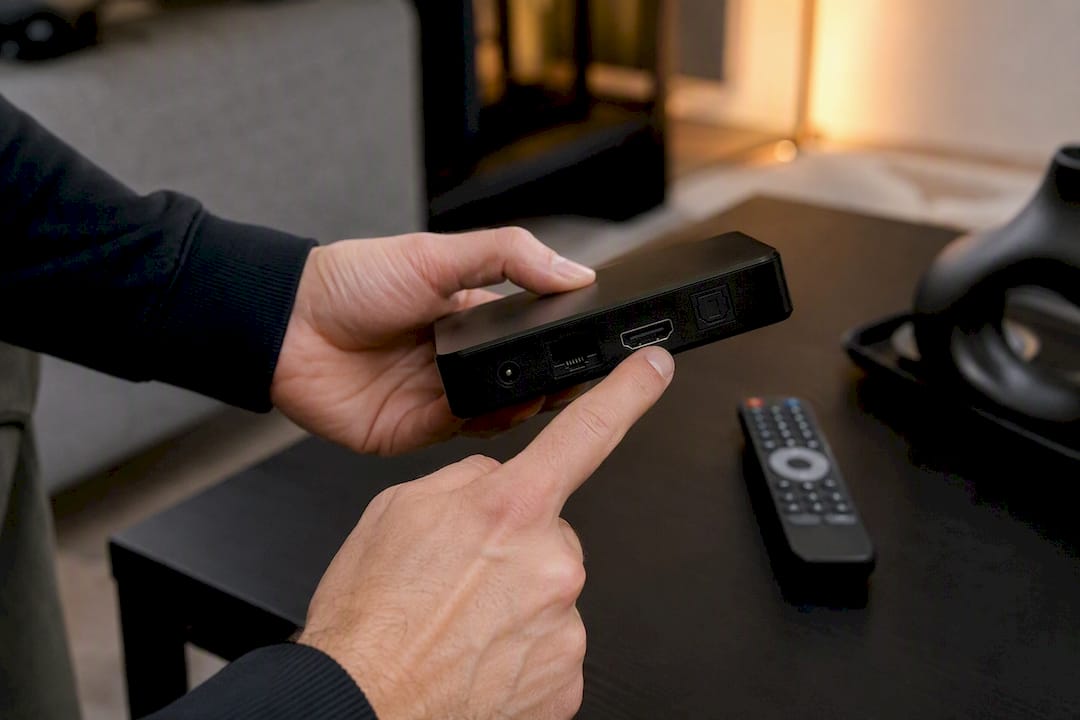
Pro Tip: Before buying any new box, check whether the seller lists Ethernet support explicitly. Many budget units mention Wi-Fi prominently and Ethernet not at all, which usually means the port is an afterthought, not a real feature.
If you already own a device and just need help getting it running, Toronto's Best IPTV has device setup guides covering the process end to end, along with a device comparison guide for readers still deciding between a Firestick, a Formuler box, or a MAG unit. Anyone leaning toward watching mainly on a phone or tablet can check the mobile installation walkthrough instead.
How do you evaluate a Chinese IPTV provider before subscribing?
Every provider's sales page looks great. The difference between a good service and a frustrating one shows up in the details most pages don't volunteer, so you have to ask.
Before handing over payment information, get answers to these questions:
- Does the trial let you test live sports and Chinese-language channels specifically, not just a generic demo feed?
- What CDN or edge routing technology backs the service during peak hours?
- Which devices are officially supported, and is there written setup guidance?
- How many simultaneous streams does one subscription allow?
- What happens if buffering is bad on launch night? Is there a refund window?
Certain patterns should make you walk away immediately:
- No trial offered at all. Real-world buffering depends heavily on delivery route and your own ISP, so a provider unwilling to let you test first is asking you to gamble blind.
- Vague or shifting channel lists that change between the sales page and the actual app.
- No device guidance whatsoever, leaving you to figure out setup through trial and error.
- Prices that seem too low for advertised 4K sports coverage. Genuine CDN and transcoding infrastructure costs money to run, and rock-bottom pricing on paper usually means corners get cut somewhere.
Trust signals point the opposite direction: a documented trial and refund policy, a provider willing to explain (in plain language) how its delivery technology works, local support you can actually reach, and a real warranty on any hardware sold alongside the subscription.
ISP throttling of high-bitrate streams and unreliable EPGs are the two most common complaints that push subscribers to cancel, so testing for exactly those two issues during a trial tells you more than any marketing claim. Run the trial for at least a day, tune into a live sports broadcast, and check whether the programme guide matches what's actually airing.
How to set up a Chinese IPTV service step by step
Getting a Chinese IPTV subscription running smoothly usually takes fifteen minutes, but skipping the network prep is where most people run into trouble later.
Start with your network, not the device. Use Ethernet if your router is anywhere near the TV. Wi-Fi works, but a wired connection removes one entire category of buffering complaints before you even open an app. Confirm your router isn't throttling video traffic, and if streams stall consistently, switching to a public DNS provider sometimes resolves routing issues your ISP's default DNS struggles with.
Here's the general setup sequence for an Android TV box or a player app:
- Connect the device to your TV and network, preferring Ethernet where possible.
- Install the player app your provider recommends, whether that's a dedicated app or something like IPTV Smarters.
- Enter your credentials or import the playlist URL provided after signup.
- Let the EPG load fully before judging channel quality. A guide that hasn't finished syncing can make a perfectly good service look broken.
- Test a live sports channel and a Chinese-language drama back to back to check both categories under real conditions.
Troubleshooting covers most remaining issues. Buffering during peak hours is usually a bandwidth or routing problem, not the app itself, so try Ethernet before blaming the service. Audio and video sync drift often clears up after a device reboot or an app cache clear. Frequent app crashes on an older box can point to insufficient RAM, in which case a newer preconfigured unit solves more than any software fix will.
Pro Tip: If a channel stutters at a specific time every evening, that's almost always a peak-hour bandwidth issue, not a broken channel. Note the exact time and channel before contacting support, since that detail helps them pinpoint the cause fast.
When a problem doesn't resolve on its own, contact support with your device model, the exact channel that failed, and the timestamp. That level of detail turns a vague "it's not working" ticket into something a support technician can actually diagnose. For hands-on installation help, Toronto's Best IPTV maintains a step-by-step Android TV setup guide and an activation tutorial covering the most common boxes in circulation.
What proof backs Toronto's Best IPTV claims?
Marketing claims are easy to write. What separates a credible Chinese IPTV provider from an empty sales pitch is whether those claims hold up when you actually test them, and Toronto's Best IPTV builds its offer around exactly that kind of verification.
Consider what's checkable within the first two days of signing up:
- Local presence since 2016, meaning the service has weathered nearly a decade of changing streaming demand rather than appearing overnight.
- Canadian edge routing, the same category of infrastructure that helps operators support both dedicated IPTV and demanding connected TV traffic without sacrificing stability.
- A two-day free trial, long enough to catch a live sports broadcast and test Chinese-language channels under real conditions.
- Dedicated customer support you can reach directly, rather than a ticket queue that disappears into silence.
- Device guides and a two-year warranty on preconfigured boxes, removing the sourcing risk that comes with unfamiliar overseas listings.
The most reliable way to judge any Chinese IPTV service isn't the spec sheet. It's whether the provider gives you a real window to test live sports and Chinese-language channels under your own network conditions before you commit.
Each proof point maps to a specific worry. Stability concerns get answered by the routing technology itself. Skepticism about performance claims gets answered by a trial you control. Setup anxiety gets answered by written device guides rather than guesswork.
What does a Chinese IPTV subscription cost?
Pricing for Chinese IPTV services varies more than most buyers expect, and the gap between "cheap" and "reliable" is usually where the real differences hide.
Toronto's Best IPTV starts plans at an accessible monthly price for a service that includes Canadian edge routing, live sports, and multilingual channel packages. Longer commitments, such as six-month or annual terms, typically bring the effective monthly cost down further, though the exact discount depends on which plan tier you choose.
The two-day free trial is the part worth paying attention to before pricing at all. It removes the biggest risk in any subscription decision: paying first, then discovering the stream stutters during the one live broadcast you actually wanted to watch. Testing during the trial costs nothing and tells you more than any price comparison chart.
When comparing plans across providers, look past the sticker price and ask what's actually included. Does the monthly rate cover multiple simultaneous streams, or does each additional device carry an extra fee? Is the on-demand library bundled in, or sold separately? A plan that looks $5 cheaper on paper can end up costing more once you add a second device connection.
For readers juggling multiple devices or a larger household, a pricing calculator that factors in extra connections gives a clearer picture than a flat advertised rate. Since Chinese IPTV audiences often span multiple generations in one household, each wanting a different channel on a different screen, that multi-device math matters more here than it does for a single-user streaming app.
How do popular Chinese IPTV providers compare?
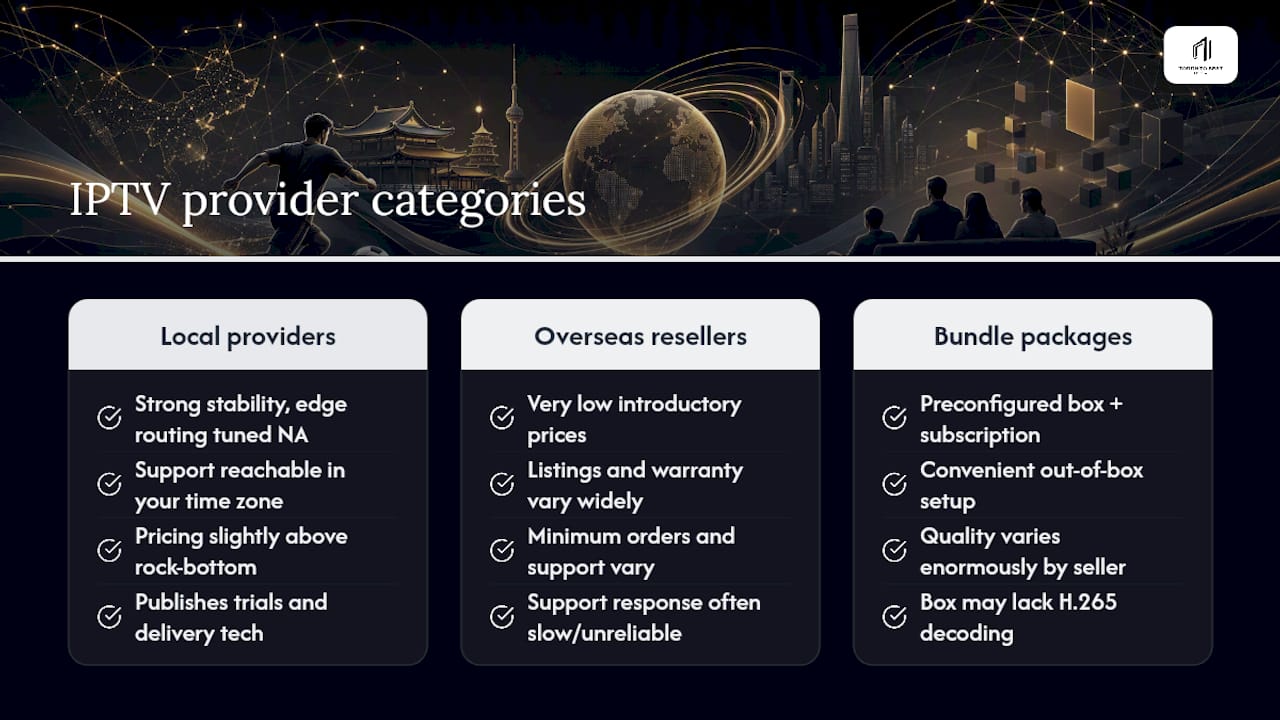
The Chinese IPTV market splits roughly into three categories, each with real trade-offs worth understanding before you pick one.
Established Canadian-based providers with local infrastructure tend to offer the strongest combination of stability and accountability. Their advantage is edge routing tuned for North American networks and support you can actually reach in your own time zone. The trade-off is that pricing sits slightly above the rock-bottom end of the market, though the reliability usually justifies it for anyone who wants live sports without interruptions.
Overseas resellers offering very low introductory prices attract buyers with sticker shock in a good way, at least initially. The problem shows up later: listings for Chinese IPTV boxes and subscriptions vary widely in warranty coverage, minimum order requirements, and how fast a seller actually responds to support issues. A subscription that's $5 cheaper isn't much of a bargain if there's nobody to contact when the stream drops during a match.
Bundled hardware-plus-subscription packages offer convenience since you get a preconfigured box and a working subscription in one purchase. The catch is that quality varies enormously by seller, and a box without proper H.265 decoding will bottleneck even the best subscription behind it.
The pattern across all three: providers that publish a real trial policy, name their delivery technology, and back hardware with a proper warranty consistently outperform those that lean on price alone. Toronto's Best IPTV fits that first category, combining local routing with a testable trial rather than asking for blind trust.
What are the support and refund policies for Chinese IPTV services?
Support quality often only becomes obvious after something goes wrong, which is exactly the wrong time to discover a provider has none.
A dedicated support channel matters more for Chinese IPTV than for most streaming products, simply because troubleshooting sometimes involves language-specific channel issues or EPG mismatches that a generic support script won't catch. Local support, reachable during hours that match your own schedule, resolves issues faster than a support ticket routed through a time zone eight hours ahead.
Refund and trial policies deserve just as much scrutiny as the channel list. A provider offering a genuine trial, like the two-day window Toronto's Best IPTV provides, signals confidence in its own delivery infrastructure. A provider that skips the trial entirely and instead offers a vague "money-back guarantee" buried in fine print is asking for trust it hasn't earned yet.
Before subscribing anywhere, confirm these three things in writing: how long the trial or refund window actually runs, what counts as a valid reason for a refund, and how quickly support typically responds to a ticket. Providers with nothing documented on any of these three points are asking you to take their word for it, which isn't a great starting position for a recurring monthly charge.
Warranty policy on hardware follows the same logic. A two-year warranty on a preconfigured box, backed by a support team you can reach directly, beats a marketplace listing with an unclear return process every time something goes wrong six months after purchase.
Is Chinese IPTV legal to use, and what are the risks?
IPTV as a delivery method is not illegal. It's simply a way of transmitting television over the internet instead of through cable or satellite infrastructure, the same shift that moved phone calls from landlines to internet-based apps over the past two decades.
What determines legality is whether the specific service holds proper licensing rights to the channels it distributes. A provider that has secured legitimate distribution agreements for Chinese networks operates within the law. A provider streaming copyrighted content without those rights does not, regardless of how professional its app looks or how many channels it lists.
The practical risk for a subscriber comes down to service reliability more than legal exposure in most cases, but it pays to be selective. Services that won't explain their content licensing, that appear and disappear overseas with no fixed business address, or that promise every premium channel for an implausibly low price are the ones most likely to have shaky legal footing behind them.
Choosing an established, transparent provider with a documented history, like a service that's operated locally since 2016, reduces this risk considerably compared to an anonymous reseller with no verifiable track record. Ask directly how a provider sources its Chinese channel content if the answer isn't already clear on its site. A provider confident in its licensing will usually answer plainly; one that dodges the question is telling you something too.
Why device setup matters more than most guides admit
Most Chinese IPTV comparisons obsess over channel counts and monthly price, then treat device setup as an afterthought buried in a support FAQ. That ordering is backwards. A subscription with the perfect channel list is worthless on a box that can't decode H.265 properly, and that mismatch is the single most common reason viewers blame a "bad service" when the real problem sits on their coffee table.
The conventional advice tells people to pick a provider first and worry about hardware later. Flip that order. Confirm your device specs, or budget for a preconfigured box with a real warranty, before you ever compare subscription prices. A $15 monthly plan running on underpowered hardware will disappoint every time, while the same plan on a properly specced box can deliver genuinely stable 4K sports.
The other overlooked point: a trial only tells you something useful if you stress-test it. Watching a quiet daytime channel for five minutes proves nothing. Tune into a live match or a primetime broadcast during the actual trial window, since that's when weak CDN routing and underpowered devices both show their limits at once. Anyone serious about getting this right should treat the trial as a diagnostic tool, not a formality to click through.
Ready to test a Chinese IPTV service for yourself?
Instead of committing to a full year based on a sales page, Toronto's Best IPTV lets you try the actual service on your own network first. Plans start from $15 a month, and the two-day free trial gives you enough time to catch a live sports broadcast and check whether Chinese-language channels hold up during peak hours.
This setup fits sports viewers who need NHL, NFL, or Premier League streams to hold steady, diaspora households looking for consistent access to CCTV, Phoenix TV, or Hunan TV, and anyone tired of a patchwork of apps that all buffer at the worst possible moment. Local Toronto support since 2016 means help is available from people who understand the specific quirks of Chinese-language programming, not a generic offshore call centre.
Check the supported device list and current plans, or browse preconfigured IPTV boxes with a two-year warranty if you'd rather start with hardware built for the job. Either way, the trial is the fastest way to know if this is the right fit before spending anything.
Sources for further reading
Verifying delivery technology and device compatibility takes more than one article, so these sources go deeper into the specifics covered above.
- BesTV powers VOD & connected TV with ATEME transcoding, covering how software transcoding supports stable stream delivery at scale
- Device setup guides for step-by-step installation help across supported devices.
- Best IPTV apps and players guide for choosing the right player app for your setup.