
Don't pay any IPTV seller who demands crypto, gift cards, or a sideloaded APK. Stick to providers with verifiable business information, refundable trials, and standard payment processors. Consumer-safety guidance from Eurojust and malware research on campaigns like Massiv both point the same direction: irreversible payments and unofficial apps are where the real damage happens. Everything below shows you how to check a provider before your card details do.
TL;DR:
- Avoid providers that only accept cryptocurrency or gift cards, as they lack consumer protections offered by standard payment methods like Visa or PayPal.
- Be wary of "lifetime" deals, unrealistic channel counts, and services with only Telegram support, which are common signs of scams.
- Verify domain age, support responsiveness, and check for legitimate reviews, as new domains and fake reviews are often used to mask scam operations.
- Beware of fake IPTV apps requesting Accessibility permissions, as they may contain malware that can steal banking details through overlay attacks.
- If scammed, promptly contact your bank or PayPal for a chargeback, change passwords, scan for malware, and report incidents to authorities to maximize recovery chances.
Table of Contents
- Top red flags that signal an IPTV scam
- How to research and vet an IPTV provider step by step
- Are fake IPTV apps putting your bank details at risk?
- What should you do if you've already been scammed?
- Setting up your IPTV device without exposing yourself to scams
- Why publisher transparency matters more than channel counts
- A vetted IPTV option that already meets this checklist
- Sources
Top red flags that signal an IPTV scam
Most IPTV scams follow the same playbook, and once you know it, spotting a bad actor takes minutes, not hours.
Crypto only, or gift cards only. Legitimate businesses take Visa, Mastercard, or PayPal because those methods carry consumer protections the seller can't opt out of. If a provider insists on Bitcoin, Interac e-Transfer to a personal account, or a gift card code read over the phone, consider this an early warning sign before you've even seen a channel list.
"Lifetime" deals. IPTV runs on ongoing licensing and server costs. A one-time payment for permanent access makes no financial sense for a legitimate operator, and it's a classic setup for a service that vanishes in six months once the money's banked.
Impossible channel counts. Ads promising 20,000+ channels for $10 a month are selling volume, not quality. Real providers publish realistic lineups because they're paying for real content licensing. Bloated numbers usually mean duplicate feeds, dead links, or pirated streams.
Telegram-only support. If the only way to reach "customer service" is a Telegram handle with no business name attached, there's no accountability trail if something goes wrong. Compare that to a provider listing transparent business and trust information you can actually verify.
Forced long prepayment. Scammers push 12 or 24 month upfront plans hard because it maximizes what they collect before disappearing. A trial period, or at least a short first billing cycle, is the standard a trustworthy service should meet.
Cloned domains and fake reviews. Watch for URLs that mimic a known provider with a swapped letter or extra hyphen, paired with a wall of five star reviews posted within days of each other.
Quick verification steps for each flag:
- Check the payment page before you check the channel list. No card option? Walk away.
- Search the refund policy by name. If it doesn't exist as a written page, assume it doesn't exist at all.
- Run a WHOIS lookup on the domain. Registration from last month is a warning sign, not a coincidence.
- Search the exact review text in quotes. Copy-pasted "testimonials" show up on multiple unrelated sites.
Pro Tip: Astroturfed reviews often cluster around domain relaunches. If a provider has three different domain names over two years and each one has a fresh batch of glowing reviews, you're not looking at a business, you're looking at a rotation scheme built to outrun its own reputation.
How to research and vet an IPTV provider step by step
Treat vetting like a short checklist you run every single time, not a gut feeling.
- Look up the company behind the site. A real business lists a name, a support email, and ideally a phone number or physical presence—not just a storefront template with no "About" page.
- Check domain age with a WHOIS tool. Providers operating since 2016 or earlier have a track record you can actually assess. A domain registered eight weeks ago hasn't earned that yet.
- Test the support channel before you pay. Send a real question by email or live chat. A provider that answers within a day, in plain language, is behaving differently than one that ghosts you until you've already paid.
- Confirm the payment processor. Standard checkout through Visa, Mastercard, or PayPal signals the business meets basic merchant requirements. Crypto-only checkout means no dispute path if the service disappears.
- Read the refund and trial terms closely. A legitimate free trial doesn't demand your full card number and a signature promising you'll be billed automatically in 48 hours with no easy cancellation.
- Check connection limits and device compatibility. Real providers state exactly how many simultaneous streams and which devices are supported, because they're managing real server capacity.
- Search for independent user reports outside the provider's own site. Long-running Reddit threads and detailed complaints carry more weight than a Trustpilot page with a handful of five-star posts, since review pages get astroturfed regularly and older, established accounts are harder to fake at scale.
| What to check | Trustworthy signal | Warning sign |
|---|---|---|
| Payment methods | Visa, Mastercard, PayPal | Crypto or gift cards only |
| Trial policy | Short trial, no forced auto-bill | Card required, instant full charge |
| Support | Email, ticketing, live chat | Telegram or WhatsApp only |
| Domain age | Multiple years, stable history | Registered within weeks |
| Reviews | Long threads, mixed detail | Clustered five-star posts |
One useful pattern worth internalizing: a service that refuses card payments is telling you it can't pass merchant verification, and that alone should end the conversation. Independent guides on vetting IPTV services consistently point to the same conclusion. If you're comparing multiple Canadian options side by side, a structured comparison of subscription features makes the differences easier to spot than scrolling ad copy.
Are fake IPTV apps putting your bank details at risk?
Yes, and the risk isn't theoretical. Security researchers have documented an active campaign spreading a banking Trojan called Massiv disguised as an IPTV streaming app. The malware asks for Accessibility Service permissions, which sounds harmless until you realize that permission lets an app read your screen, log keystrokes, and act on your behalf inside other apps, including your banking app.
Fake IPTV apps built around the Massiv Trojan family request Accessibility permissions to capture screen input directly, giving attackers a way to intercept banking credentials the moment you type them.
Kaspersky's research traced this distribution through sideloaded APKs, meaning files downloaded outside the Google Play Store and installed manually. PCWorld's reporting on the same campaign found the malware can bypass some banking-app protections using overlay attacks, essentially placing a fake login screen on top of your real banking app so you type your credentials straight into the attacker's trap.
Interest in these fake apps spikes around major sporting events, when demand for cheap live-sports streaming peaks and scammers know people are searching fast and clicking faster.
Three defences cut this risk down to nearly nothing:
- Only install apps from the Google Play Store or Apple App Store, never from a link texted or messaged to you.
- Keep Google Play Protect switched on and let it scan new installs automatically.
- Check what permissions an app requests during setup. An IPTV player asking for Accessibility Service access has no legitimate reason to need it.
Watch for overlays too: if a login screen looks slightly off, has odd spacing, or appears a beat late after tapping an app icon, close it and check your accounts from a separate device.
What should you do if you've already been scammed?
Move fast, because payment disputes have time limits and malware keeps working the longer it stays installed.
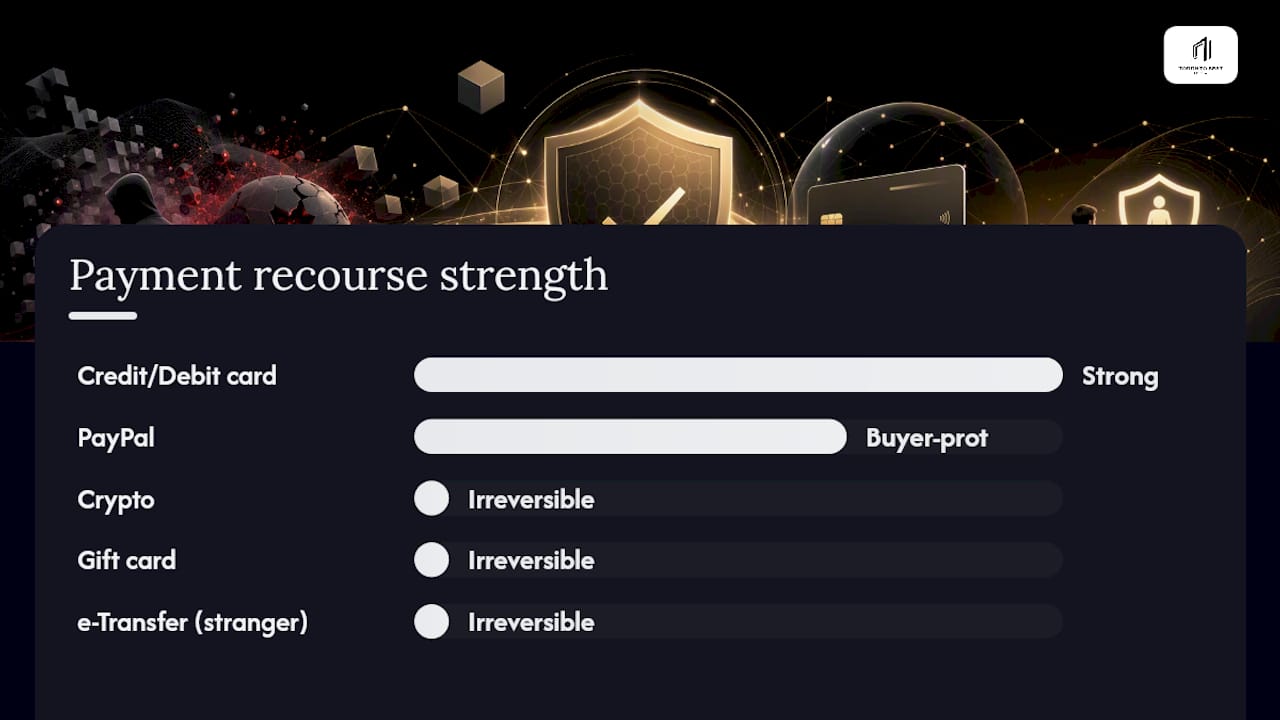
The payment method you used determines how much recourse you have. Credit and debit cards carry chargeback rights through your bank, and PayPal has its own buyer-protection process, both of which give you a real path to get money back. Crypto transfers, gift cards, and e-Transfers to a stranger's account are functionally irreversible, which is precisely why scammers push so hard for them.
A legitimate trial should let you test the service without handing over full billing authorization, and cancelling should take one click, not a phone call to a number that never picks up. If a "free trial" auto-charges your card within 48 hours before you've watched a single channel, that's not a trial, that's a bait.
If you suspect you've been scammed, work through this in order:
- Screenshot every receipt, confirmation email, and chat log before the provider's site disappears.
- Contact your bank or card issuer immediately and request a fraud dispute or chargeback.
- Change your passwords, starting with banking and email, especially if you sideloaded an app tied to the purchase.
- Run a full antivirus scan and uninstall the suspicious app right away.
- Report the incident to your local police and to Canada's Canadian Anti-Fraud Centre.
Pro Tip: Banks generally give you a stronger case for a chargeback the sooner you report it. Waiting weeks "to see if the service comes back" often weakens your claim, so act the same day you notice something's wrong.
Setting up your IPTV device without exposing yourself to scams
The safest habit in this whole space is simple: keep your player and your source separate. That means using a neutral, general-purpose IPTV player from an official app store rather than a vendor-locked app tied to one provider. If a provider ever goes dark or turns out to be a scam, you can point a standalone player at a different, trustworthy source without reinstalling anything or losing your setup. A browsable list of reliable players makes this easy whether you're on a phone, a streaming box, or Android TV.
A few habits keep your whole setup clean:
- Update your player app and your device firmware regularly, since patches often close the exact security gaps malware relies on.
- Use a password manager instead of storing login or payment details in a notes app or a screenshot.
- Keep Google Play Protect enabled and run a security scan every month or two, especially if you sideload anything.
- If you use a VPN, understand it's a privacy tool, not a legal workaround, and it won't make an unauthorized service authorized.
- If you're buying a pre-configured box rather than setting up your own device, buy from a seller with a real warranty and support history, not a marketplace listing with no seller information.
Why publisher transparency matters more than channel counts
A real business has practices like these in this checklist that aren't abstract ideas. Some providers offer a short free trial and standard card payment options so customers can test services before committing and have a way out if something's wrong. If you want to check our own business details against the standards in this article, our trust and verification page lays it all out.
— Aj
A vetted IPTV option that already meets this checklist
You don't have to take every safety step alone. Torontobestiptv was built around the exact standards this checklist demands: standard card and PayPal checkout, a refundable two-day free trial, published business information, and dedicated local support you can actually reach.
Some specifics worth knowing before comparing IPTV services include:
- Plans starting at a low monthly price, without crypto-only checkout or forced multi-year prepayment.
- Technology that aims to reduce buffering during live sports when demand spikes.
- Pre-configured boxes may come with warranties to reduce hardware risks.
If you're ready to see the full lineup and pricing for yourself, visit the Torontobestiptv homepage and start the two-day trial before committing to anything.
Sources
- How fake Android IPTV apps are stealing users’ money and data | Kaspersky official blog
- Android malware alert: fake IPTV apps will steal your bank details | PCWorld
- Flyer: How to identify illegal IPTV services | Eurojust